

A data destruction machine must remove every trace of information on a device to prevent recovery. If any platter — the magnetic circular disk in the hard drive, chip or cartridge — remains readable, the result can lead to compliance failure.
That risk applies whether you manage decommissioned drives in a data center, handle protected health information (PHI) in a health care setting or process classified assets under a deferred contract.
Strict standards such as NIST SP 800-88, HIPAA Security Rule and ISO/IEC 21964 — which standardized DIN 66399 — define destruction not by appearance but by measurable output. This includes specific particle sizes or complete chip disintegration. The correct machine depends on your storage media, data classification and required audit trail.
This article breaks down how to choose the right data destruction machine so your equipment matches both your regulatory scope and your operational demands.
Step 1: Identify the Media You Want to Destroy
The type of media you’re destroying dictates the appropriate method of destruction. Every media storage device uses its own storage structure, and the destruction method and machine must be matched to the exact component that carries the data in order to be effective. Here are some examples:
- Hard disk drives (HDDs) store data on magnetic platters. These devices lose information when degaussed or when the platters are bent, preventing them from spinning. A degausser may be sufficient, but a disintegrator will provide more comprehensive destruction.
- Solid state drives (SSDs) use multiple memory chips inside a case. Each chip must be pulverized into small particles to remove stored charge. An SSD disintegrator or a combo HDD and SSD disintegrator ensures more complete destruction of data.
- Tapes and legacy media record data on magnetic film. They must be cut into small pieces to break the magnetic path.
Step 2: Meet Data Center Data Destruction Requirements
Once you’ve identified your media, the next crucial step is to align your destruction method with the specific regulations governing your industry and data classification. For example, HIPAA controls health care records, while the Federal Trade Commission controls customer information that identifies a person. Federal security programs control the clearance, purging, and destruction of classified material.
Each standard has its own rules for effective destruction, and the machine you choose needs to meet these requirements. These standards include:
- HIPAA Security Rule: This standard sets administrative, physical, and technical safeguards for electronic PHI (ePHI), including disposal. It outlines how to prevent anticipated access to or disclosure of ePHI by clearing, purging, or destroying the media before it leaves your control.
- NIST SP 800-88 Rev. 2 (2025): This standard defines the sanitization outcomes of “clear,” “purge” and “destroy.” For SSDs, it requires destruction methods that break the chips into small particles. For HDDs, it allows purging methods such as degaussing in some cases, and purge plus physical destruction for higher sensitivity and classified drives.
- DIN 66399 (ISO/IEC 21964): This standard defines security levels, typically ranging from 1 (lowest) to 7 (highest), and establishes specific particle size requirements for each media type. Most audit programs map physical destruction requirements to a specific level for each data category.
When meeting data center or facility requirements, it is also essential to consider factors such as space needs, available electrical power, and workplace compliance requirements, including OSHA and NIOSH, as well as health-related considerations such as indoor air quality.
Step 3: Determine How Small Data Should Be Shredded To
Finally, determine the particle size limit that dictates when data is considered to be destroyed, based on the governing rules specific to your industry. These limits change by data class, like medical records, personal customer information, or classified material. Make sure the particle size of your chosen machine matches the rule tied to the data type you handle.
For example:
- For HDDs, we recommend that drives containing sensitive data be shredded into particles of 2 millimeters or less, to ensure that platters are split or ground into irrecoverable fragments.
- SSDs must be shredded into particles of 2 millimeters or less, meeting the National Security Agency’s CSS EPL minimum. Data can remain readable on any partial chip, so pulverization is necessary to meet compliance.
Finding the Right Data Destruction Machine for Your Needs
Understanding your media type, its specific regulatory requirements, and particle size limits is the first step to choosing a machine that delivers compliant data destruction. To meet these diverse demands, we offer a variety of industry-leading shredding solutions designed for security and efficiency. Customized solutions are also available as we want our clients to find the machine that best meets both their data destruction requirements and their throughput needs.
What Is the Best Shredder for Data Centers?
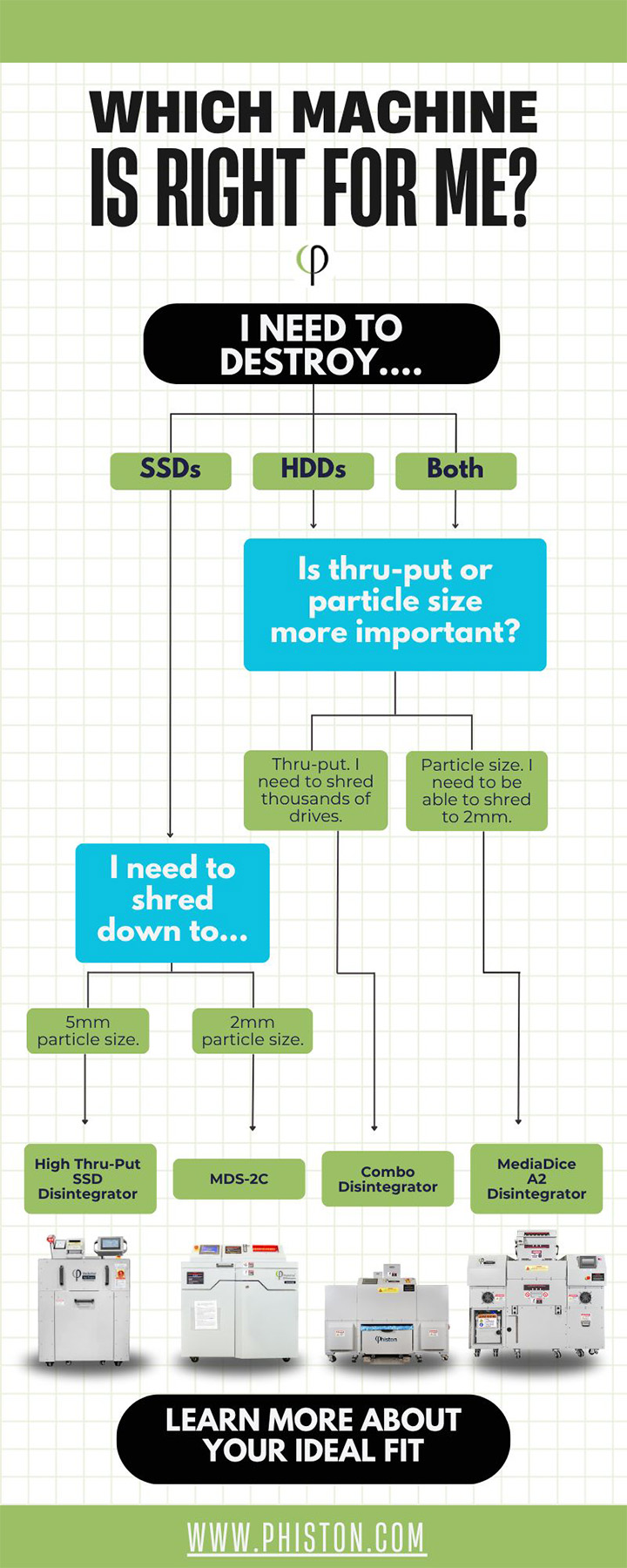
A data center needs a shredder that can handle a high volume and reduce every storage device to the particle size required for its data category. Invest in a high-strength shredder that can break HDD platters into compliant fragments. Consider one of these machines, based on your volume and particle size needs:
- MediaDice® All Media Disintegrator A2: This all-in-one powerhouse shreds SSDs, HDDs, AI chips, boards, and switches to 2-millimeter particles. It shreds 100 to 200 drives per hour, integrated with security controls, HEPA filtration system, cycle counter, and a magnetic separator for downstream recycling.
- MediaDice® Combo Disintegrator: This high-capacity unit disintegrates more than 1,000 HDDs per hour to 20-millimeter strips. It can disintegrate over 7,200 SSDs into 5-millimeter particles within an hour, offering the highest throughput on the market.
What Is the Best Shredder for Destroying SSDs?
Use an SSD shredder that pulverizes chips to 2 millimeters or smaller, is made with National Security Agency (NSA) guidelines in mind, and supports high throughput. We also recommend the machines previously mentioned, but if you are looking for a solution whose main focus is SSD destruction, then the following machines may align with your solid state drive requirements:
- MediaDice® SSD Disintegrator-2C: This high-volume data center solution features a 7.5-horsepower motor that shreds up to 240 SSDs per hour into particles of 2 millimeters or less. It features an auto-loader, recyclable output, and a patented knife-mill pulverizer.
- MediaVise® Compact SSD Destroyer: This portable desktop unit punctures solid-state drives within 30 seconds with 40,000 pounds of force. It can destroy up to 100 SSDs per hour with quiet operation and a clean debris chute.
Review the Best Hard Drive Shredders for Your Facility
Making data unrecoverable protects your business from unwanted exposure and costly breaches. When every device is destroyed at the correct level, private records stay contained and can’t surface in the wrong place.
Secure destruction practices close the gap that digital erasure alone can’t cover. Phiston Technologies provides controlled destruction systems that help you keep sensitive information private. Contact us for a custom solution tailored to your needs, and enjoy the peace of mind that comes with knowing your data is effectively destroyed.